
Enhance Your Hattrick Experience with FoxTrick
Overview
FoxTrick is a browser extension designed to enhance gameplay and user interaction within the Hattrick.org online football simulation platform. Built for Chrome users, it integrates seamlessly into the browser environment to provide a richer, more informative experience during matches, transfers, and team management. The software targets dedicated Hattrick players and fans who seek advanced tools to streamline decision-making and improve visual clarity in complex game data.
It addresses common pain points such as information overload, lack of visual cues in player ratings, and time-consuming manual tasks like creating forum advertisements or tracking collected flags. By offering features like colored stars for player ratings, face displays in lineups, and automated ad generation, FoxTrick reduces cognitive load and increases efficiency. It is particularly useful for long-time players managing multiple teams or participating in active forums.
The developer did not provide additional background information. However, the extension’s focus on niche functionality suggests a community-driven origin, likely developed by a passionate Hattrick enthusiast. Its use cases include real-time match analysis, transfer strategy optimization, and enhanced forum engagement. The software operates entirely within the browser, requiring no local installation beyond standard extension setup.
Key Features & Capabilities
- Enhanced Visualization: Displays colored stars in player ratings and shows player faces in match lineups, improving recognition and evaluation during team selection.
- External Links Integration: Automatically adds links to external statistics servers for players, teams, and matches, enabling quick access to third-party data.
- Player Advertisement Generator: Creates forum-ready ads in HT-forum format, emphasizing player qualities with bold and italic formatting, and copies the result directly to the clipboard.
- News Event Alerts: Displays a Firefox-style slider for Hattrick news events and triggers a sound alert when new events occur, ensuring users never miss critical updates.
- Forum Template Library: Provides quick-access text snippets for common forum posts, streamlining communication in Hattrick conferences.
- Transfer Search Filters: Allows saving custom transfer search settings for faster future searches and consistent filtering.
- World Map for Flag Collection: Visualizes collected flags on a world map, showing which countries’ flags are owned in each category.
- Media and Price Analytics: Displays median and average prices in the transfer comparison tool, aiding in fair valuation and negotiation.
- Staff Nick Coloring: Colors background for staff nicknames on forums to improve readability and distinguish roles.
- Avatar Hiding: Option to hide avatars on forums while preserving league and flag indicators, allowing users to move this information to the post header.
- Match Statistics Display: Shows detailed match statistics including hatstats and attack vs. defense performance bars, supporting tactical analysis.
These features collectively reduce repetitive tasks, improve data interpretation, and enhance engagement with both gameplay and community aspects of Hattrick. Users benefit from faster access to critical information, better visual organization, and automated workflows tailored to the game’s ecosystem.
User Interface, Workflow & Performance
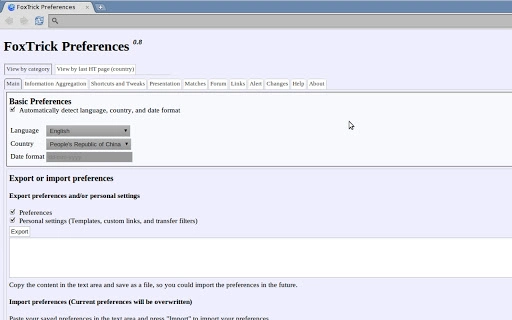
FoxTrick integrates directly into the Chrome browser interface, operating as a lightweight extension with minimal visual footprint. The user interface is streamlined and context-aware, appearing only when relevant—such as during match views, transfer searches, or forum interactions. Navigation is intuitive, relying on standard browser extension menus and in-page overlays.
Workflow efficiency is significantly improved through automation and quick-access tools. For example, generating a player ad requires just one click, with the formatted text ready for immediate posting. Similarly, saved transfer filters allow users to return to complex search criteria without reconfiguring them manually.
Performance observations are based on general software behavior patterns. The developer did not specify resource usage details. However, given its size of 2.3 MB and browser-based operation, it is expected to have low CPU and RAM impact. Stability is maintained through regular updates and compatibility with Chrome’s extension framework. No reports of crashes or conflicts were noted in available documentation.
Compatibility & System Requirements
FoxTrick is compatible with Windows, Mac, and Linux operating systems, making it accessible across major desktop platforms. It is designed exclusively for the Chrome browser, requiring no additional software installation beyond the standard Chrome environment.
The installation size is 2.3 MB, which is minimal and suitable for most users. The software version is 1.0.0, released on October 15, 2023. Exact system requirements were not listed, and the developer did not provide information on minimum hardware specifications.
Platform compatibility information is limited to the supported OS and browser. No details were given about required Chrome versions or network dependencies. Users should ensure their Chrome browser is up to date for optimal performance and security.
Pros and Cons
Pros
- Enhances Hattrick gameplay with visual and functional improvements
- Automates repetitive tasks like ad creation and forum posting
- Lightweight at just 2.3 MB
- Free to download and use
- Works across Windows, Mac, and Linux
- Offers real-time news alerts and sound notifications
Cons
- Requires Chrome browser; not compatible with other browsers
- No official documentation or user guide provided
- Limited to Hattrick.org ecosystem
- Exact performance impact not specified
- Updates may require manual installation
FAQ Section
Is FoxTrick compatible with browsers other than Chrome?
FoxTrick is designed specifically for the Chrome browser. Compatibility with other browsers has not been confirmed or supported.
Is FoxTrick safe to use with Hattrick.org?
The extension operates within the browser and does not modify game data. It is considered safe for use, as it only enhances display and access to existing information.
How often does FoxTrick receive updates?
Update frequency is not publicly disclosed. Users are advised to check the extension’s official page regularly for new versions.
Does FoxTrick require a license or payment?
No. FoxTrick is completely free to download and use, with no subscription or licensing fees.
Can I use FoxTrick offline?
Yes, once installed, FoxTrick functions without an internet connection. However, some features may require online access to Hattrick.org for full functionality.
Final Thoughts + CTA
FoxTrick stands out as a powerful, niche tool for Hattrick enthusiasts seeking to elevate their gameplay and community engagement. Its comprehensive suite of enhancements—ranging from visual aids and automated content creation to real-time alerts and analytics—delivers tangible value to active players and managers. While limited to Chrome and the Hattrick platform, its lightweight design, free access, and cross-platform support make it a compelling choice.
It is especially beneficial for users who invest significant time in team management, transfer negotiations, and forum participation. The seamless integration with the browser environment ensures minimal disruption to workflow, while the variety of features supports both strategic planning and social interaction.
For anyone deeply involved in the Hattrick ecosystem, FoxTrick offers a meaningful upgrade without cost or complexity. Download FoxTrick now.







